Open in code editorv4.0.503
Remotion Studio can quickly open various things in your code editor:
- compositions
- sequences
- error stack frames
If no preference was set, Remotion will try to detect an already running editor.
Setting your preferred editor
In the Studio
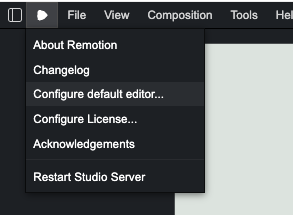
In Remotion Studio, select Configure default editor... from the Remotion menu to choose from an installed editor. This also writes in the config file (see below).
In the config file
Set the editor for your project using Config.setDefaultEditor():
remotion.config.tsConfig .setDefaultEditor ('cursor');
The supported editor IDs are:
vscode(also recognizes Insiders)cursorwindsurfzed(also recognizes Zed Preview)vscodiumwebstormsublime-text.
If the configured editor is not installed, Remotion prints a warning and falls back to automatic editor detection.
If you work in a team with differing preferences, we recommend setting an environment variable and reading from process.env.
Via command line
The --editor command line flag takes precedence over all other options.
Configuring a custom editor
This works only in the config file.
Pass a custom editor object if your editor is not built in:
remotion.config.tsConfig .setDefaultEditor ({type : 'custom',name : 'My Editor',executable :process .env .REMOTION_EDITOR_PATH !,arguments : ['--goto', '%TARGET_PATH%:%LINE_NUMBER%:%COLUMN_NUMBER%'], });
Use an environment variable for an absolute executable path if the configuration file is committed, because installation paths differ between computers.
type
Must be 'custom'.
name
The name shown in Remotion Studio.
executable
An executable path or a command on PATH. macOS .app bundles, Linux executables, and Windows .exe and .com files are supported.
Windows scripts such as .bat and .cmd are not supported because they require a shell.
arguments
An array containing one command-line argument per item. Do not add quotes around paths with spaces; each item is passed directly to the executable without shell parsing.
At least one item must include %TARGET_PATH%. Remotion replaces these placeholders before launching the editor:
| Placeholder | Value |
|---|---|
%TARGET_PATH% | Absolute source file or project directory path. Windows editors launched through WSL receive a relative path. |
%LINE_NUMBER% | One-based source line. |
%COLUMN_NUMBER% | One-based source column. |