Custom Layers
The Lambda function includes Chrome and base fonts by default.
In some advanced use cases, you want to replace certain parts of the stack:
- Use another Chrome version (you may need to build it yourself)
- Replace default fonts or emojis
Before you create a custom stack, feel free to contact us to see if Remotion can provide the changes upstream.
AWS Lambda limits the combined uncompressed size of the function ZIP and all attached layers to 250 MiB.
If you just want to add fonts, we recommend to use Web fonts instead.
Default layersv4.0.534
Consider using our layer options before creating a custom stack:
The following uncompressed sizes apply to Remotion v4.0.534, which uses Chromium 157.0.8080.0. 1 MiB is 1,048,576 bytes.
For older Remotion versions, see the archived default-layer documentation from v4.0.533.
With the default option (--runtime-preference=cjk or no option):
| Item | Size |
|---|---|
| chromium | 188.96 MiB |
| emoji-google | 4.76 MiB |
| fonts | 1.87 MiB |
| cjk | 14.07 MiB |
| Total layers | 209.66 MiB |
With the option --runtime-preference=apple-emojis:
| Item | Size |
|---|---|
| chromium | 188.96 MiB |
| emoji-apple | 8.57 MiB |
| fonts | 1.87 MiB |
| Total layers | 199.40 MiB |
For Remotion v4.0.534, the totals above exclude the function ZIP, which also counts toward the 250 MiB limit. Any custom layers also count toward the same limit.
Enabling Apple Emojis replaces the Google Emoji and CJK (Chinese, Japanese, Korean) layers. Load additional fonts as Web fonts if you need CJK characters with Apple Emojis.
Ensure Remotion version
Customizing Remotion Lambda Layers is possible from v3.0.17.
Lambda binaries might change in minor Remotion versions, it is your responsibility to keep your versions up to date.
Creating a custom binary
Clone the remotion-dev/remotion repository and use its packages/lambda-binaries package:
Prepare the Lambda binariesgit clone https://github.com/remotion-dev/remotion.git cd remotion bun install cd packages/lambda-binaries bun run download
The download command fetches versioned archives from remotion.media, verifies their SHA-256 checksums, and extracts them into layers/. Regular dependency installation and builds do not download these binaries. Running the download command again preserves existing layer directories and your changes.
The layers/chromium and layers/fonts folders contain the binaries for ARM64. The x64 version has been discontinued. The layers/emoji-apple, layers/emoji-google, and layers/cjk folders contain the optional emoji and CJK layers.
Put the files that you want in the corresponding folders. For example, add custom fonts to layers/fonts/.fonts/NotoSans/.
Keep the function ZIP and all layers within the combined 250 MiB uncompressed limit. Remove unneeded files from your custom layers if necessary.
You can see the size of the folders by running:
Check uncompressed layer sizesbun run size
If you are done with your changes, run:
Package the custom layersbun run zip
This will zip the layers and put them as artifacts in the out directory.
Creating a Lambda layer
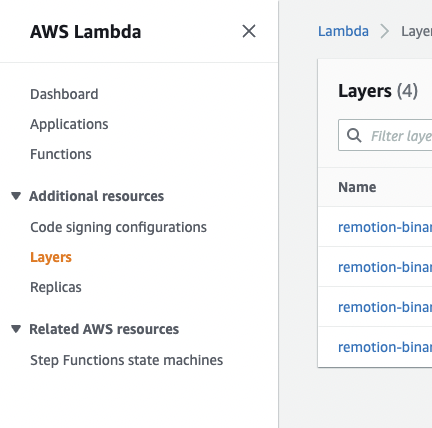
- Go to your AWS console, select the Lambda product, then select "Layers":
-
Select "Create layer" and fill out the name. Upload the created layer from the
outfolder into the form. The fields "Compatible architectures", "Compatible runtimes" and "License" are optional. -
Once the layer is created, you will get a version ARN (example:
arn:aws:lambda:us-east-1:123456789012:layer:apple-emoji:1). Copy it.
You need to do this for every AWS region you want to use Remotion Lambda in.
Specify custom Layers while deployingv4.0.510
Pass every runtime Layer to deployFunction() or --custom-layer-arns. The list replaces all Remotion-hosted Layers.
Credentials used to deploy custom Layers need lambda:GetLayerVersion permission for the specified Layer ARNs. Updating an existing function additionally needs lambda:GetFunctionConfiguration and lambda:UpdateFunctionConfiguration.
Custom Layers are required in AWS China regions.
Update the Lambda function
Before you continue, make sure a Remotion Lambda function is deployed.
To switch out the layer of a deployed Lambda function, you can either do it via the AWS console or use a Node.JS script that you can run after every function deploy.
- Node.JS
- AWS console
- Go to your AWS console, select the Lambda product, then select the Lambda function you would like to update.
- Click on "Layers":
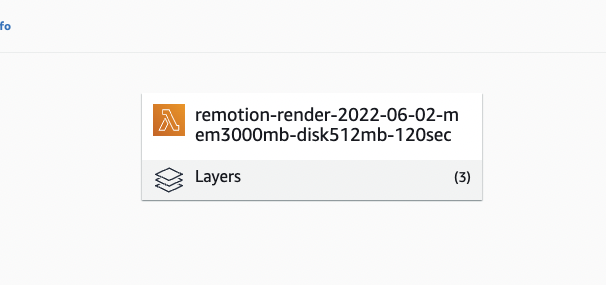
- Click on "Edit", then select the layer you'd like to replace, then click "Remove", then click "Save".
- Once returned, click "Add a layer", then click "Specify an ARN", then paste in the layer version ARN you retrieved from the previous step.
- Click "Verify" and then "Add".
Congrats! You customized your Lambda function.
Before you can update a function via the Node.JS APIs, you need to add another rule to your user role:
[
{
"Sid": "UpdateFunction",
"Effect": "Allow",
"Action": ["lambda:GetFunctionConfiguration", "lambda:UpdateFunctionConfiguration"],
"Resource": ["arn:aws:lambda:*:*:function:remotion-render-*"]
},
{
"Sid": "GetOwnLayerVersion",
"Effect": "Allow",
"Action": ["lambda:GetLayerVersion"],
"Resource": ["*"]
}
]Given a region, function name, layer to remove and layer to add, you can use the following snippet to update a function with custom layers
import {AwsRegion, getAwsClient} from '@remotion/lambda';
// Customize these parameters
const REGION: AwsRegion = 'us-east-1';
const FUNCTION_NAME = 'remotion-render-2022-06-02-mem3000mb-disk2048mb-120sec';
const LAYER_TO_REMOVE = /fonts/;
const LAYER_TO_ADD = 'arn:aws:lambda:us-east-1:1234567891:layer:apple-emoji:1';
const {client, sdk} = getAwsClient({
region: REGION,
service: 'lambda',
});
const fnConfig = await client.send(
new sdk.GetFunctionConfigurationCommand({
FunctionName: FUNCTION_NAME,
}),
);
if (!fnConfig) {
throw new Error(`Function ${FUNCTION_NAME} not deployed`);
}
await client.send(
new sdk.UpdateFunctionConfigurationCommand({
FunctionName: FUNCTION_NAME,
Layers: [...(fnConfig.Layers ?? []).filter((l) => !l.Arn?.match(LAYER_TO_REMOVE)).map((l) => l.Arn as string), LAYER_TO_ADD],
}),
);