curves()v4.0.537
Part of the @remotion/effects package.
Maps input color values to output values along a curve. Adjust all RGB channels together or one channel at a time to change contrast, brightness, and color balance.
Preview
Example
An S-shaped curve darkens shadows and brightens highlights:
MyComp.tsximport {Video } from '@remotion/media'; import {curves } from '@remotion/effects/curves'; export constMyComp :React .FC = () => { return ( <Video src ="https://remotion.media/video.mp4"effects ={[curves ({points : [ [0, 0], [0.25, 0.12], [0.75, 0.88], [1, 1], ], }), ]} /> ); };
Editing in Studio
The Curves panel shows an input histogram behind the curve. Click the graph to add a point or drag a point to move it. Right-click a point and choose Remove point, or select it and press Delete.
Use the Channel dropdown above the graph to adjust RGB, red, green, or blue. Stack multiple curves() effects to combine adjustments to different channels. Effects are applied in array order.
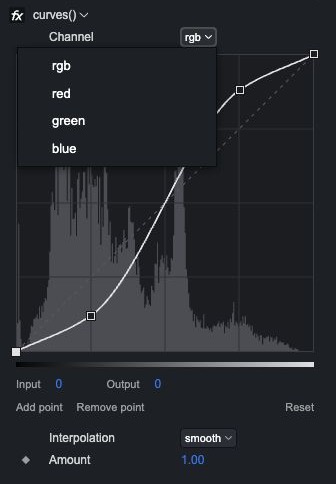
The amount can be keyframed in Studio. To animate control points, update points in code using useCurrentFrame().
API
You can call curves() without arguments or pass an object with the following properties.
points?
An array of [input, output] pairs. Both coordinates range from 0 to 1. Defaults to [[0, 0], [1, 1]], which leaves the image unchanged.
Provide between 2 and 32 points, ordered by strictly increasing input values. Output values may increase or decrease. Input values below the first point or above the last point map to the nearest endpoint's output value.
To convert coordinates from an editor that uses 0 to 255, divide each value by 255.
channel?
The color channels to adjust: 'rgb', 'red', 'green', or 'blue'. Defaults to 'rgb', which applies the same curve to all three channels. Alpha is preserved.
interpolation?
How to connect the control points: 'smooth' or 'linear'. Defaults to 'smooth'.
'smooth' uses a smooth cubic spline that follows the control points in the graph. It can overshoot between points; output values are clamped to 0–1. 'linear' connects adjacent points with straight lines.
amount?
Blends between the original and adjusted colors, from 0 to 1. Defaults to 1, which applies the full adjustment. 0 leaves the image unchanged.
disabled?
When true, the effect is skipped. Defaults to false.
Compatibility
| Browsers | Environments | |||||
|---|---|---|---|---|---|---|
Chrome | Firefox | Safari | ||||